Showing posts with label Windows. Show all posts

Monday, August 8, 2016

MyQuery 3.5.6 released

I released version 3.5.6 of MyQuery, and there are quite a number of new features and fixes in there. The #1 bugfix is that the annoying access warnings that poped up from Windows when saving to the registry are gone, as I have now moved the registry to a more Windows 10 acceptable place. Among the new features are:
  • JSON format output when saving results.
  • More flexible CSV format output with many new options.
  • Ability to save Dyncol as JSON in CSV and JSON output.
  • Nicer formatting of numbers in status dialogs.
  • Auto refresh of status dialogs
 As this is a version with many new features, I still consider this a Beta. I have built it on Windows 10 and tested it on Windows 10 and 7, 64-bit, although MyQuery itself is still a 32-bit windows application.

Happy SQL'ing
/Karlsson

Monday, March 3, 2014

MyQuery 3.5.4 Released - Now with Client side dynamic columns!

It was quite a while ago since I released a new version of MyQuery, my Windows based query tool for MariaDB and MySQL. I did build a 3.5.3 version, but I decided not to do a public release of that. But now we have 3.5.4 ready, and there is some new shiny features in it. The main feature is that the dialog that you can use to inspect individual fields with, which pops up when you doubleclick (or now you can Right-click and select Show Menu) in a field, has been expanded.

To being with, you can use this to navigate the fields, so that you don't have to close this dialog and open it in the next field, instead there are navigational buttons in the Dialog.

But there is also some additions to the dialog itself. If you are using MariaDB and the Dynamic Columns feature, which is mostly used with the Cassandra Storage Engine but can be used with any blob data in any engine, then you can view these in the ShowData dialog, either as a tree or as JSON.

Another addition is that I have upgraded help links to MySQL 5.6 and MariaDB 10. Also, a lot of MariaDB features and now syntax coloured as appropriate. Another usability feature is the ability to copy a single column from a query result to the clipboard.

Download MySQL 3.5.4 from sourceforge and enjoy!

/Karlsson

Thursday, November 28, 2013

MariaDB Database Disk snapshot backups on Windows

Using disk snapshots to perform MariaDB backups has become more and more common, but this seems to have been limited to Linux and Cloud environments. There seems that there has been a notion that Snapshots cannot be done on native Windows, the way we can do snapshots using LVM on Linux for example. This is actually False, if you use the NTFS filesystem snapshoting is built in and has been so for a long time, the base for it is the Volume Snapshot Service (VSS) which was introduced as far back as Windows XP.

Using Snapshots to backup on Linux or Windows works well, assuming that the storage engine you use can recover on startup, the backups created this was are physically consistent but not logically, but InnoDB will recover this. Also note that any warnings about using snapshots with MyISAM also applies to the mysql database, i.e. the database metadata. Usually though, this is not an issue, but if you want to protect yourself even more then use a FLUSH TABLES WITH READ LOCK and backup the MyISAM tables separately somehow. But this is no different between Windows and Linux in this case, this is an attribute of any kind of disk snapshot backups.

VSS is a services that run on Windows and to utilize it some programming is needed, but luckily that has already been done for us, there is a simple utility called VSHADOW.EXE available from Microsoft that can be used to access the VSS service. Some version of Windows, such as Windows Server 2008, Windows Server 2012 and also with a version of Windows that is very little used, probably there are more users of Windows 3.10, than of Windows 8, come with DISKSHADOW.EXE, a utility that does the same thing, basically, but has a different interface. In Windows 7, that I tested on, there is VSSADMIN.EXE instead, but as VSHADOW.EXE can be added, I downloaded that one as it is more functional (It is part of the Windows SDK). All this mess (c) Microsoft.

So, how does this work then? As I said, this is different than on Linux (what? Windows being different than Linux? No kidding?). Using the API you can create two types of snapshots, persistent and non-persistent. The difference is that a persistent snapshot is one that remains until specifically removed, whereas a non-persistent one goes away when the program that created it exists. As we are about to take a backup here, I guess you think we want a permanent one, but that is not so, as VSHADOW can run a command file for us, before it exists.

I will use an example here, for that I have placed my MariaDB data on the E-drive in a directory called \data, which means my my.ini has this line in it:
[mysqld]
datadir=E:/Data


Next question then is where the snapshot is placed? Well, the snapshot ends up as a Windows device with a name along the lines of \\?\Volume{5b3610ce-d2cb-11e2-a649-2cd05a8ad0c9}\ which is just as easy to remember and type as the novel War and Peace (Yes, Tolstoy was a Windows guy, I guess you didn't know that!). Yes, again, thank you Microsoft, Windows is SOO user friendly! Anyway, yet again VSHADOW helps us out, as it can create a command file for us that will contain the names of the devices and some other things. It can look something like this and I have called it vss-setvar.cmd:
@echo.
@echo [This script is generated by VSHADOW.EXE for the shadow set {c8fcb322-ce02-409a-b609-7fc04311fad1}]
@echo.

SET SHADOW_SET_ID={c8fcb322-ce02-409a-b609-7fc04311fad1}
SET SHADOW_ID_1={11243eaf-0234-4784-92e1-9bc24668b5b4}
SET SHADOW_DEVICE_1=\\?\GLOBALROOT\Device\HarddiskVolumeShadowCopy8


OK then, so this is generated for us, how do we use that? Well, what we do is create a command script that is called by VSHADOW as I said before, and this calls the generated scripts to get all the details. An example script, that I call e-backup.cmd, can look like this:
call vss-setvar.cmd
@echo off
dosdev T: %SHADOW_DEVICE_1%
robocopy T:\Data C:\Backup /MIR
dosdev /r /d T:


There are still a few missing bits here though. The call command is calling the generated file as above (you can call this anything you want, see the example command line below) and what about the command DOSDEV? What is that, that is a simple little utility you can find on the net (Google is your friend) that allows you to create a DOS device from a device descriptor, and it can also remove them. There are other ways of dealing with this, but I choose this path my my example here. Robocopy you probably know already and the /MIR option is used to tell robocopy to mirror a full directory tree.

So what the command script above will do is create a DOS device called T: for my snapshot, copy that to a directory called C:\Backup and then remove the T: device.

Now we have a command script (not two, the first one I showed was an example of a generated one) and an idea what it does, to do a shadow copy now, we just need to call vshadow, and it will do the work for us. We pass three parameters:
  • The name of a script with the device names and things to generate.
  • The name of a script to run
  • The name of the drive to create a shadow device of.
Using the example above to create a backup of the E-drive, where I have my MariaDB datafiles in the \data directory, this is the command I use:
vshadow -script=vss-setvar.cmd -exec=e-backup.cmd E:
So that's about it, now you know how to create an online snapshot backup of a MariaDB database on Windows.

/Karlsson

Friday, May 31, 2013

MyQuery 3.5.2 Beta available

I have just posted version 3.5.2 of MyQuery on sourceforge. This version adds just one feature: The ability to run LOAD DATA LOCAL INFILE and in the process adds a few features to this, such as a progess window and the ability to stop a running load.

Download and enjoy!

/Karlsson

Tuesday, October 23, 2012

MyQuery 3.5.0 available

I just made MyQuery 3.5.0 available for download from sourceforge. If you do not know about this program, this is my Windows based MySQL Query editor and database monitor program. And yes, it is Windows only.

It was a long time since I updated MyQuery, but I have been been at it for a long time, but slowly as I haven't had the bandwidth, and I have collected a few things I wanted in this release, but of all those things, many has to wait for now, as decided to add a major feature which did require a fair bit of coding and testing: autocomplete. When editing SQL statements, autocomplete for names of tables, columns etc is really useful, but it is not as easy as it sounds. What makes this a bit complicated are things like the default database (which I need to figure out for anything that is typed), table aliases and separate name spaces (which is a good thing, but makes like in this instance difficult).

Table aliases are particularly nasty as MyQuery really doesn't parse the SQL but just uses the current names of all objects. So when I type table1. you might expect a lit of all columns in the table table1 to be listed, but it isn't as easy as that as table1 might be an alias for another table. The way I manage this right now is to list all columns in all tables when I see something which looks like a table name (table1 in this case), but there is no such table (and no such database for that matter), I list all columns in all tables in the current database. This might not be what you want, but it's the best I can do right now.

To be honest, I really think autocomplete is a terribly useful feature, in particular when dealing with databases with many tables or tables with long names (such as when working with the information_schema database).

Another thing I have added in this release is a more flexible way of dealing with database status variables, which can now be organized into groups, which are easy to manage and which are persisted.

What I want to add is stuff like MySQL 5.6 information_schema additions, MariaDB specific functions and engines, JSON load and unload and some other MySQL 5.6 stuff. In addition, I'd like to do some integration with my sqlstats plugin. But now I have at least finished MyQuery 3.5.0, and I'm quite happy with it. If you have used earlier versions of MyQuery, this version also fixes a bunch of minor memory leaks and at least one crashing bug (which happened in some instances in the connect dialog).

Happy SQLing!
/Karlsson

Thursday, September 6, 2012

MySQL Server installer on Windows

I don't what makes this so hard for MySQL Developers at Oracle. Look, I know you guys are trying hard, that's not it, and I also know that chasing SQL Server is a priority, and that is fine. But for that to work, the MySQL MSI Installer has to get better! It just has to. Like some basic issues like these:

  • You can not use the MSI installer to install two MySQL servers on the same box. If the installer seems an old installation, it insists on upgrading it if you are installing a newer version, and if you are installing an older version, well, that will be refused.
  • You cannot, using the MSI installer, install both 32 and 64-bit versions on the same box. If you try that, even if the versions are the same, the second install insists that what you have already installed is newer than the one you are installing, although the have the same version number, but one is 32 bit and one is 64 bit.
  • In the Instance configurator when it comes to the data directory location, if you select "Installation path" you might think that the data directory will be placed where you are installing MySQL right now. Think again, this is not so. What this means is that if you install MySQL on the box, and MySQL hasn't been installed there before, then Installation path means just that, So let's assume that you choose to install MySQL in C:\foo, then the data directory will be C:\foo\data. Which is fine. If you then uninstall this version of MySQL and then install some other version of it, this time in, say, C:\bar, then you would image that the data directory would be C:\bar\data, but it will still be C:\foo\data. I'm not sure where this is stored, but it is somewhere and it's really annoying.
So, if a developer wants to run with the 32-bit version of the MySQL library (say because he / she is using a 32-bit driver for MySQL), then you cannot use the MSI. If someone would have given this an extra round of thinking, then the MySQL 64-bit server installation, would have included both the 32-bit and the 64-bit versions of the client. Right? I'll see if I have the bandwidth and energy to report these issues as bugs.

Will the MySQL Installer help then? That is a 201 Mb package that contains, according to the download page "All MySQL Products. For all Windows Platforms. In one package." Right, that should do the trick then? Nope, once you have made the choice to install MySQL Server, be it 32 or 64 bit, you can only install one of them.

Look, I'm trying hard not to be a grumpy old man here, but it is difficult (partly because I'm getting old I guess). I am aware that I can always download and unpack the ZIP archive (which is what I will do now), but please folks, this is on Windows and I'd rather stay away from that on that platform. And Oracle / MySQL took the effort to create not just one, but 2 installers, but none of them allow you to install 2 MySQL servers on the same machine, which is too bad.

And by the way, no just because I am installing MySQL and then uninstalling it, and then installing it again, doesn't mean I want to use the same data. It just doesn't.

And I am afraid that if you think MariaDB is any better, think again, that is NOT the case. Too bad.

/Karlsson

Thursday, September 22, 2011

MySQL Installer, once again

First an apology. I have not been blogging much lately, but I do have a reason, and I think a valid one for once (i.e. not along the lines of "I was out drinking last night" or "I was busy boiling potatoes" or something), I have been moving house. And my new office is now as tidy as ever (and if you believe that, let me tell you about a bridge in New York that I have for sale at a really good price). No, the place is a mess, but my beautiful wife keeps up with me, and I am slowly getting things together.

That said, let's get to the point, MySQL Installer! If you read this blog, you know I have copmplained about this puppy several times before (First attempts with MySQL Installer and MySQL Installer part 2), and I have been in touch with the good developers at MySQL / Sun / Oracle / Google (no wait, that last one wasn't right. At least not yet) and for all intents and purposes, they are doing their best (I already knew that) and are listening to us.

So now MySQL Installer is GA. Is it any better than when I complained last time? It sure is!

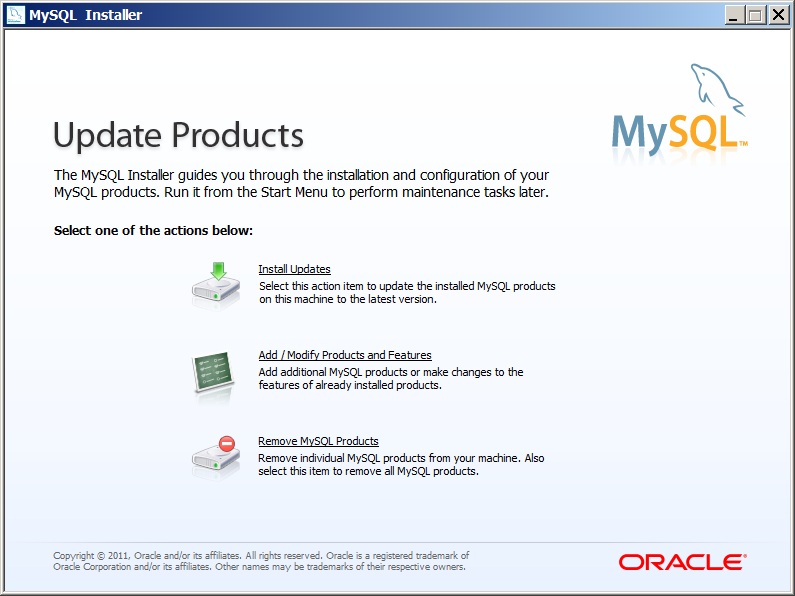
Now it does what it was set out to do, it does install most of what you need as a MySQL Developer on Windows, it installs the MySQL Server, the Workbench and the drivers. This time around, I removed all Windows products first and then did a clean install, but some old settings still seemed to be around. This could be annoying potentiually, but the machine I was testing really has had a lot of testing on it, so it might be that this is in a weird state. Also, this might be what you want to do. Before doing a clean install, I tried an Upgrade. I had MySQL 5.5.14 on my box, and the installer came with MySQL 5.5.15, so I figured it would offer mne to upgrade if I choose Add/Modify Products and Features. On the other hand, after a clean install, if I choose Add/Modify Products and Features again, the installer insist that there are "changes pending" to the MySQL .NET Connector. If I execute that it executes OK, but the Installer still insist that there are "changes pending" to Connector/.NET.

This may sound like a lot of complaints, but it really is not that bad. If I was a Windows developer coming new to MySQL, this is not a bad starting point at all. But if I was Oracle (which I am not), I'd add a few things:
  • Links - I'd offer in the installer too add a few links to useful places on the net for MySQL stuff. This includes Planet MySQL, MySQL Forge, dev.mysql.com, www.mysql.com, the Bug database (how active that is these days I don't know either).
  • Third party software - There is some third party software that could be interesting to include, such as drivers (PHP etc), tools, plugins etc. There is a whole bunch of these available, and if I was new to MySQL, I would have a hard time selecting which to include and what to do with them. I understand the licensing issues here, but as this is the Community edition of MySQL, that shouldn't be too difficult.
  • Tips and tricks - How do you do this or that? What questions might a Windows developer have when approaching MySQL for the first time.
  • Integration - I would really like to see more integration here, with Visual Studio and with many other Windows developer tools. I admit that this might be there, but that the integration is hidden from me as I don't have those tools.
These are just some ideas moving forward with MySQL Installer. The current product is a bit limited I think, but still useful and is now pretty stable. Why the MySQL Installer is not available on a swedish mirrow is beyond me, but that is a minor issue I think, unless you live in Sweden (like I do).

For reference, I used 1.0.17 of MySQL Installer, something which is not that easy to find out, as the download page states that this is version 5.5.15 (which is the MySQL Server version). The installer itself doesn't say what version it is, at least not as far as I can find out. It does say in the VERSION resource of the MySQLInstaller.exe file though, so looking at properties with Windows Explorer reveals the version.

/Karlsson

Wednesday, July 20, 2011

MySQL Installer part 2

OK, I was having too much fun in my last post on this subject, so I try again. Just to be safe i Uninstall MySQL Installer, reboot my machine, and download the Installer again. Installing it this time didn't make anything happen it seemed? No dialogs, no nothing? But it is back there in the Start menu at least... OK, Let's try that one...
Think think think.. Whammo:
Yes, I am aware this is running on Swedish Windows, but let's try it on a US Windows 7 installation....

Downloaded and tried it on this machine, and now the installer runs at least. The "configuration" step doesn't actually do much. The Connector/.NET installation still insists on not finding a download location at first, but suddenly it works. The Installer also finds old versions of MySQL, which is nice, but it doesn't seem to know how to handle that. I still get into a state which the Installer doesn't know how to get out of, and just hangs (on "Validating installation").

As there is no nice cnfiguration screen, and the VS integration plugin is not included, I don't really find this installer such an "easy to use" thingy. To being with, it will not let me choose WHERE to install things (no, I do not want MySQL on C:, even thogh may other programs are there. In particular, I do not want C: to be my drive where the database is kept! As C: is an SSD which is there to speed up booting, not to have MySQL fuzz around with it).

No, this wasn't really easy to use at all. No, it didn't help much. Yes, the interface is very nice. No, I do not think this is RC quality software.

/Karlsson

Tuesday, July 19, 2011

First attempts with MySQL Installer

This was a sad day for me. I once, when I was at MySQL, was a big fan of a better installer for MySQL on Windows. Something that would install all you wanted on just Windows, in a way applicable for Windows and integrating with the appropriate Windows products. So installing MySQL would not just install MySQL, it would also install the Visual Studio plugin for MySQL, for example, if you so requested (and the installer might even be so smart so it could check if VS was installed, and then ask you politely if you wanted the plugin). The same goes for ODBC drivers, .NET drivers and what have you not.

Fact is, I had this idea a long time ago and was promoting it inside MySQL with my usual frenzy when I think I have a good idea, although I wasn't the first to have this idea.

So, now, after all these years, and I have even left MySQL since, this Installer is soon ready for prime time, MySQL Installer is at it's last RC before GA! So I decided to download it and see what they have done with this smart idea. And boy was I disappointed.

To begin with, it is announced as "RC" but the download page calls it "Beta" still. Hmmm whatever. Also, it is 32-bit only, there is no 64-bit download. But thinking about it, I realize this might be for the installer itself (32-bit that is), it might well install 64-bit software. And it does, thank you, but this should be made more clear, and why we even bother with 32-bit builds anymore i beyond me? Why not go for 16-bit while we are at it?

And without further ado, here is my verdict: It would be quite OK, assuming it was a Pre-alpha release! No, this is very far from RC quality! I am sorry MySQL and all developers who have put in lots of effort into this thingy, but is not good enough. far from it actually! Maybe it wasn't tested enough, maybe it wasn't tested at all? But frankly, from an RC product I don't expect "Unhandled exception" after just a few minutes or perfectly normal use.

One thing it does is that it downloads the suff on an as needed basis. In my case, it failed to find a download location for Connector/.NET (I am in the middle of nowhere, I know that, I mean Sweden, what kind of weird place is THAT? and Stockholm?). After that failure, nothing worked. retrying it to no avail. Not finding a download location for Connector/.NET (I have heard that .NET is pretty popular on Windows, but what do I know) and this stopping the whole installation process with an Unhandled exception. No, that is not RC, that is what we in the rest of world call Pre-Alpha.

For your own good, and for the sake of MySQL Credibility on Windows (which I am a fan of, and I am sure we can get this installer going): Do not release MySQL INstaller in this shape!

Calling it quits for the day, thinking Good idea, bad execution and feeling a bit sad
/Karlsson
And if you ask: Yes, I did report a few bugs on MySQL Installer today

Monday, April 4, 2011

MyQuery 3.4.2 available

MyQuery, the ad-hoc query and scripting tool for MySQL, as always running on Windows, supporting servers on any platform, is now available in version 3.4.2. This version has a few minor bug-fixes in the "Break long lines" plugin that cleans up SQL text, and also a few additions to this plugin.
I have not heard of any issues with MyQuery itself since I released 3.4.1, but I will not take the 3.4 version into GA until I have fixed a few more things in the "Break long lines" plugin to turn it into a more full-features SQL beautifier with a lot more features than now.
Until then though, 3.4.2 is what you want, and the Compact Spaces option in the Break Long Lines plugin that is added with this release, should provide useful.

In addition to all this, if you want to meet up and discuss this tool, then I am at your service at the MySQL Usre Conference coming up next week.

Best regards
Anders Karlsson

Monday, November 29, 2010

Announcement: MyQuery 3.4.1 Released

MyQuery 4version 3.4.1 is now released on Sourceforge: http://sourceforge.net/projects/myquery/. This is a pretty minor release with just a few fixes, but the first of them pretty significant:
  • Windows 7 User Access Control (UAC) issue fixed - When running on Windows 7, the Windows UAC would prohibit MyQuery from starting, complaining about registry access. For once, this was not yet another UAC annoyance, but an actual bug that I hadn't caught before. Now, this should work OK even on Windows 7.
  • SQL Statement normalization issues - The SQL Statements dialog got statements wrong at times, and could cause a crash. This was due to a bug in the normalization of SQL Statements and this is now fixed, including refining the normalization a bit.
  • Optionally Show SQL SELECT tool output vertically - This will turn the output from the SQL command in a SELECT tool around. This is for running statements that will produce multiple columns instead of multiple rows, such as SHOW SLAVE STATUS and SHOW MASTER STATUS. The output from these commands is weird, the multi-column layout really isn't useful, but this little feature fixes that.
Happy SQL Coding!
/Karlsson

Saturday, November 27, 2010

Perl is probably a fine scripting language, but on Windows...

Please do not assume Perl is always installed on all platforms. In particular not on Windows! Just as it is probably a bad idea to assume that Windows DOS commands work on Linux! Come on now!

Why am I making a fuzz you ask, do I have a problem with you writing stuff in Perl (personally, I don't even like Perl, but that's another issue)? Nope. But somewhat modern software really should not assume that you have Perl, or DOS, or some other arcane, not terribly standardized piece of software around for a server to do it's job. And MySQL still have a way to go to be reasonably good on Windows. Downloading the lastest RC, 5.5.7, MySQLhas managed to screw up at least two things, at least, in my mind. But maybe that's just me:

  • The optimzied. non debug libraries, are now in /lib under the distribution, not in /lib/opt where they used to be. I see no good reason for this, to be honest (place the libraries where you want, of course, but once a release is out, don't move them around at random in upcoming releases). This has been reported as bug #58532
  • To make it realhard for us in the community to test this release Candidate version of MySQL, to iron out the bugs, MySQL decided not to include dynamic debug client libraries, only the static ones. Why this makes things difficult, you have to do some development on Windows to userstand. For a bunch of reasons (not necessarily good reasons, but if you are Microsoft, you are allowed to do whatever you choose, no reason needed, except that maybe it's the 7th hour on the 7th month and it's afull moon coming up or something), Micosoft compiles stuff so that a static library depends on stuff included by the compiler itself. So if the compiler version changes, the library will not work properly anymore. In short, you need to build your applications with the same version of Visual Studio as the MySQL Client library was built with. Yikes! (For more Yikes, see MySQL bug #58531)
None of this is any fun. And to add insult to injury, in the bin directory of the MySQL distribution on Windows, in 5.5.7, I find the following files: mysql_config.pl, mysqld_multi.pl and 4 more. Yes, Perl programs. No, I do not have Perl install on my Windows boxes. I'm about to test this and see how it worls aout. Above all, I want to test if mysql_config works as expected.

All in all: Please remove Perl depenent client programs from the MySQL distribution! And mysqld_multi seems rather superflous on Windows in general, if you ask me (not that it even works, check bug #58553).

/Karlsson

Tuesday, October 19, 2010

MyQuery 3.4.0 Released!

I have not finished MyQuery 3.4.0, after a long time of weekend and spare-time development. This version adds some features that are basically Scintilla featires that I have integrated with. This includes error indicators, margin markers and some other things. In particular the margin markers changes a few things in the interface: When running up to, or continue from a point in teh script, then use the margin marker instead of the current line! If you don't like this, then don't set the margin marker and the current line will be used just like in old releases.

Another addition this release is Online help. I get the help contents from the database that you connect to, which is installed with most MySQL installations in the tables called help_xxx in the mysql schema.

External program has a few more options, and in this release the installer installs a few of those, just to show how it works, like the MySQL schema in an editor window and direct access to the MySQL commandline.

In addition to this, and a few more minor features, there is a whole bunch of bugfixes in this release, which doesn't mean that some doesn't remain. Above all, I have reengineered how I handle multiple access to the MySQL connection.

Download it from Soureforge! I will follow up this post with some more on how to use MyQuery, how to build extensions and plugins and some things like that!

Happy SQLing
/Karlsson
PS. If you have issues with MyQuery, drop me an email, but note that I am now at anders@recordedfuture.com!

Thursday, October 14, 2010

MyQuery 3.4 soon to be released

I've been spending some cycles now and then on MyQuery 3.4. One thing I wanted to do with this release was to fix some long-standing bugs I knew about, but hadn't identified (Are you seeing ReleaseSemaphore errors? That's one of them). Also, I had a couple of issues with the new Plugins, as well as some ideas for new features, such as OnLine Help.

In addition to that, I also felt that the Scintilla editor controls tht I was using wasn't used to it's full potential.

As I have the new 3.4 in front of me now, I have done something about all those things. I have cleaned up some of the more recent code, I have added OnLine help, in this case I get that from the MySQL help tables. I am pretty happy with how a few more steps to integration with Scintilla could add so much more usability, Scintilla really is a great editor control with a lot of potential, I haven't reallly explored it fully yet, and there is more to do. Also, Scintilla is really solid.

What remains to be done is to test, package and publish MyQuery 3.4. This will be a Beta, but I will release a GA based on it real soon. Before that, I have one or two plugins I want to add (Replication monitoring for example). Also, I have a plan to add some more advanced error handling, using Scintilla to show erroneous text in a better way than today. But all in all, we are now close to GA.

Cheers and see you soon!
/Karlsson

Sunday, June 20, 2010

Running MySQL Cluster as a Service on Windows

The MySQL Cluster daemon for MySQL Cluster (ndbd and ndb_mgmd) doesn't by themselves yet let them run as a service (apparently ndb_mgmd does, but I haven't seen it documented anywhere on how to do that). But there are ways to fix this, using some simple Windows tools and some registry hacking.

What you need to find is the Windows Resource Kit from some version of Windows that includes instsrv.exe and srvany.exe. It is not too picky with the actual version of Windows you run it seems, I used the Windows NT 32-bit versions of these on a 64-bit Windows 7 box, and it works just fine.

These two programs are simple and are easy to use:
  • instsrv allows you to install a service, it's real simple, just run the program and it will show the options (and these are few).
  • srvany allows you to run any odd program, that is not intended run as a service, do do this anyway.
Now, Google a bit and download these two puppies and open a DOS Window and change directory to where you installed these guys. Now we are realy to install three services (1 for the mgm and two datanodes), so they will run the srvany program:
F:>ResKit> instsrv mgm1 F:\ResKit\srvany.exe
F:>ResKit> instsrv ndbd1 F:\ResKit\srvany.exe
F:>ResKit> instsrv ndbd2 F:\ResKit\srvany.exe

These three services are rather boring now, they do not do anything, really. To fix this, open the registry editor (regedit) and open:
HKEY_LOCAL_MACHINE\System\CurrentControlset\services\mgm1
Now, we need to define what srvany.exe should run. In the key above, create a new key called Parameters. In this key then, create two values of the type REG_SZ:
  • Application - The full path to the program srvany should run.
  • AppParameters - The parameters to pass to the program srvany will run.
In my case, I set these to, for the mgm service:
Application: F:\MySQL714\bin\ndb_mgmd.exe
AppParams: --config-file=F:\MySQL714\mgm1\config.ini --configdir=F:\MySQL714\mgm1

I think you see where I'm going with this, but just to be sure, this is what I set for the ndbd1 service:
Application: F:\MySQL714\bin\ndbd.exe
AppParams: --ndb_connectstring=nodeid=2;host=localhost:1186

And that's it, folks! Well, one more thing I guess, we want to install the MySQL Server as a serive also, but this knows how to install itself as a service and can also run nicely as a service, so this is easy:
F:\ResKit>F:\MySQL714\bin\mysqld --install MySQL714 --defaults-file=F:\MySQL714\my.ini

Make sure that the ini-file for the MySQL server is configured to access the cluster we just set up, and to have the ndbcluster engine enabled (for some reason, the latter is not enabled by default). Do this by editing the my.ini file used by the server (and referenced above) and add the following two lines to the [mysqld] section:
ndb-connectstring=host=localhost:1186
ndbcluster

Now we have created and configured a bunch of services for a MySQL Cluster setup, and to try it out, lets start them using the NET command line program (the SC command may also be used):
F:\ResKit> net start mgm1
F:\ResKit> net start ndbd1
F:\ResKit> net start ndbd2
F:\ResKit> net start MySQL714

Have fun! And just a word of caution: Although this works just fine for testing, note that shutdown of the ndbd and mgm services isnt really graceful here, so this is just for fun and testing. Also, ndbd and ndb_mgmd will sure be possible to run as a Windows service in their own right, in some future version of MySQL Cluster.

/Karlsson

MySQL Cluster NDB MGM API on Windows

As MySQL Cluster is now available, and GA, on Windows, maybe it's time for some NDB API coding on that platform, right? The reason for this might, as it is in my case, be that Windows is a pretty good GUI Desktop platform, and MySQL Cluster / NDB really needs something like this. Those of you who have followed and used Cluster for a while, might remember my ndbtop tool that I created way back, and which is a MySQL Cluster monitor for Linux using ncurses. This is still useful I guess, but as far as a nice GUI presentation goes, ncurses leaves a lot to be desiered, to say the least.

So where do we start on Windows then? Well, to be honest, MySQL Cluster on Windows doesn't currently come with an installer, it's just a .zip file to unpack. But we are only using NDBAPI and the NDBMGMAPI, so that it no big deal, right? Just unpack the zip-file, write your C or C++ and compile with the supplied includefiles and libraries? Right?

Nope, sorry to disappoint you, but it is more complicated than that. MySQL Cluster on Windows doesn't include ndbapi in the binary release. You might think it does, considering there is a ndbapi.lib file and stuff. But this is not enough, you want the includefiles and also a few more libraries. Also, these are static libraries, which will confuse things a bit. Let me explain this first:

Microsoft has a habit of introducing new things in the C and C++ compilers that rely on things in the C runtime library. This is not a good habit, as it break compatability when building static libraries in particular. What happens is that the static library contains references to the embedded C RTL, and if I link with that library, I will have conflicts between the C RTL that my program wants, and the one that is in the library. And if I link my application without including the standard C RTL, and rely on the one in the library I am linking with, then things may break as my compiled code may contain references that are part of the C RTL I am using, but isn't part of the C RTL of the library I am linking with.

Anyone who has, on Windows, linked with the static MySQL Client library (mysqlclient.lib) knows what I am talking about here, and you also know the solution out of this mess: Compile the library yourself with the Microsoft compiler you use for your application.

So we need to revert to the source anyway. I use Visual Studio 2010 these days, but this is not really supported by the MySQL Build process, or to be honest, I haven't even tried it. I have VS 2008 installed on the same machine, build the project for that, and then let VS 2010 convert it.

So go along and do what is usually done when building MySQL from Source on Windows:
  • Get cmake from http://www.cmake.org.
  • Use a DOS prompt and go to the main directory where you unpacked the MySQL Cluster sources.
  • In the DOS Window run the command:
    win\configure.js WITH_NDBCLUSTER_STORAGE_ENGINE
  • In the DOS Window run the command:
    win\build-vs9
  • All this will create a MySql.sln file in the main directory of the MySQL Cluster sources.
  • Open the MySql.sln file with the Visual Stuio versioon of your choise.
Having done all this, select the Release build and build the following projects:
  • mysys (mysys\Release\mysys.lib)
  • strings (strings\Release\strings.lib)
  • ndbgeneral (storage\ndb\src\common\util\Release\ndbgeneral.lib)
  • ndbportlib (storage\ndb\src\common\portlib\Release\ndbportlib.lib)
  • ndblogger (storage\ndb\src\common\logger\Release\ndblogger.lib)
  • ndbtrace (storage\ndb\src\common\debugger\Release\ndbtrace.lib)
  • ndbmgmapi (storage\ndb\src\mgmapi\Release\ndbmgmapi.lib)
You can of course build the whole shebang also, if you so wish. Now, after all this fun, what's the next step? First copy the above libraries (the paths are in prenteses after the library names) to some easy to remember place. I have downloaded the MySQL Cluster Binary also, and have placed these files in a new ndbapi directory under the lib directory. In addition, you need to copy a few includefiles, in my case to the MySQL Cluster binary include directory:
  • ndb_init.h (storage\ndb\include\ndb_init.h)
  • ndb_types.h (storage\ndb\include\ndb_types.h)
  • ndb_constants.h (storage\ndb\include\ndb_constants.h)
  • the whole mgmapi directory (storage\ndb\include\mgmapi)
The files are copied in my case to the location where I have the MySQL Cluster Binary includefiles, and the mgmapi directory is copied as sibdirectory to this).

Whoa, that was a lot of fun and copying! Right? Or?
Anyway, you should now be able to build a MySQL Cluster NDB MGM API application. Note that we did a Release build of the libaries, so to avoid warnings, build your application in Release build also. Include the path to the MySQL Cluster Binary include directory for the compiler and point the linked to the lib directory created above. And then one more this:
The static libraries already have a reference to the C Run Time library, so tell Visual Studio to disreard the LIBCMT default library. You do this Linker->Input settings in the "Ignore Specific Default Libraries", which you set to LIBCMT. If you build from the commandline, this is the same as /NODEFAULTLIB:"LIBCMT"

Having done all this, your application should compile, link and run just fine. For your reference, here is a Windows command-line program that will show the nodes in the Cluster and the status of them. And yes, the whole idea was to build a GUI application, but it's just too much code for a sample like this. Here you go anyway:

#include
#include
#include
#include
#include
#include
#include

typedef struct tagTEXTMAP
{
int nValue;
char *pText;
} TEXTMAP, *PTEXTMAP;

TEXTMAP g_NodeType[] = {
{ NDB_MGM_NODE_TYPE_API, "API" },
{ NDB_MGM_NODE_TYPE_NDB, "Data" },
{ NDB_MGM_NODE_TYPE_MGM, "MGM" },
{ NDB_MGM_NODE_TYPE_UNKNOWN, "Unknown" },
{ 0, NULL }};

TEXTMAP g_NodeStatus[] = {
{ NDB_MGM_NODE_STATUS_UNKNOWN, "Unknown status" },
{ NDB_MGM_NODE_STATUS_NO_CONTACT, "No contact" },
{ NDB_MGM_NODE_STATUS_NOT_STARTED, "Not started" },
{ NDB_MGM_NODE_STATUS_STARTING, "Starting" },
{ NDB_MGM_NODE_STATUS_STARTED, "Started" },
{ NDB_MGM_NODE_STATUS_SHUTTING_DOWN, "Shutting down" },
{ NDB_MGM_NODE_STATUS_RESTARTING, "Restarting" },
{ NDB_MGM_NODE_STATUS_SINGLEUSER, "Single user" },
{ NDB_MGM_NODE_STATUS_RESUME, "Resuming" },
{ 0, NULL }};

int main(int argc, char *argv[])
{
NdbMgmHandle hMgm;
ndb_mgm_cluster_state *pState;
ndb_mgm_node_state *pNodeState;
PTEXTMAP pMap;
char *pNodeType;
char *pNodeStatus;
int i;

// Check arguments.
if(argc < 2)
{
fprintf(stderr, "Usage: %s \n", argv[0]);
return 1;
}
ndb_init();
hMgm = ndb_mgm_create_handle();

// Connect to mgm server.
ndb_mgm_set_connectstring(hMgm, argv[1]);
if(ndb_mgm_connect(hMgm, 0, 0, 0) == -1)
{
fprintf(stderr, "Error connecting to cluster\n");
return 1;
}

pState = ndb_mgm_get_status(hMgm);
for(i = 0; i < no_of_nodes; i++)
{
pNodeState = &pState->node_states[i];
for(pMap = g_NodeType; pMap->pText != NULL && pMap->nValue != pNodeState->node_type; pMap++)
;
if(pMap->pText == NULL)
pNodeStatus = "Unknown type";
else
pNodeType = pMap->pText;
for(pMap = g_NodeStatus; pMap->pText != NULL && pMap->nValue != pNodeState->node_status; pMap++)
;
if(pMap->pText == NULL)
pNodeStatus = "Unknown status";
else
pNodeStatus = pMap->pText;

printf("Node id: %d at %s. Type: %s. Status: %s\n", pNodeState->node_id, pNodeState->connect_address,
pNodeType, pNodeStatus);
}
}

/Karlsson